

A calendar that understands service work.
See appointments, providers, services, and locations in one schedule. Handle recurring and multi-service visits without piecing the day together across tools.
Appointments & Calendar
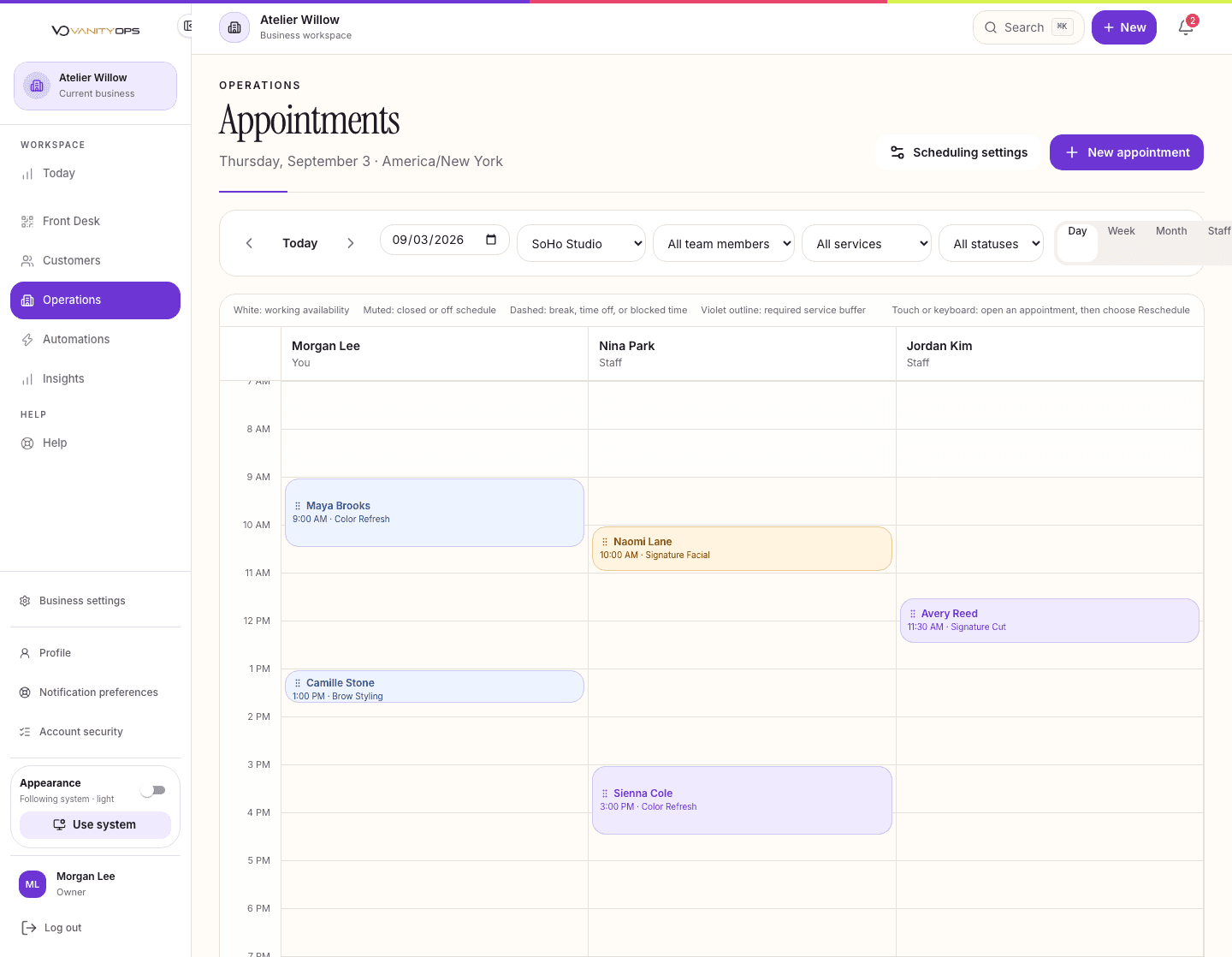
Keep your schedule, team and customers in sync.
See who is working, what they can book and which times are still available at a location.
Day and week scheduling
Staff, service, and location availability
Recurring and multi-service bookings
Rescheduling, cancellations, and reminders
Schedule views by location
Appointments & Calendar questions.
Owners and managers can coordinate the schedule. Staff see appointments according to their role and assigned location.
When signup is available, Essential, Team, and Premier include a full 15-day trial of the exact plan you choose. Complete setup and save a card, then confirm your own launch to start your 15-day free trial, with $0 subscription charges today. Check pricing for the current access path; an early-access request does not start a trial.
Bookings, customer records and the Front Desk share a workspace. Continue using your payment processor to take payments.
Essential supports one staff member. Team adds team scheduling. Premier includes multi-location controls where available.
Access is scoped to the business and the signed-in person’s permissions. Staff work with the records they are authorized to see.
Use the early access form for availability updates, or review the current signup path on the pricing page.